

Smart thermostat installation in Dubai is worth considering when your AC system supports it and you will use the controls regularly. The right setup depends on matching the thermostat to your property’s air-conditioning system.
This guide explains central, split and multi-split AC systems, along with what Nest supply, installation, warranty and setup support involve.
Key Takeaways
- Identify your AC system type and wiring before choosing a thermostat; adaptors may be needed for some split or multi-split systems.
- Understand what Nest supply, installation, setup and warranty arrangements cover so you can plan the installation around your device and needs.
- Prepare for setup by arranging the thermostat, Wi-Fi access and app login details for the appointment.
- Choose settings and smart-home integrations that suit how you use each AC zone, and consider Electrical support when the work involves property systems.
AC system compatibility
Smart thermostat compatibility depends on your AC system type and existing wiring. Confirming both helps determine whether a thermostat can control your air conditioning as intended.
Thermostat Fit With Air Conditioning Systems
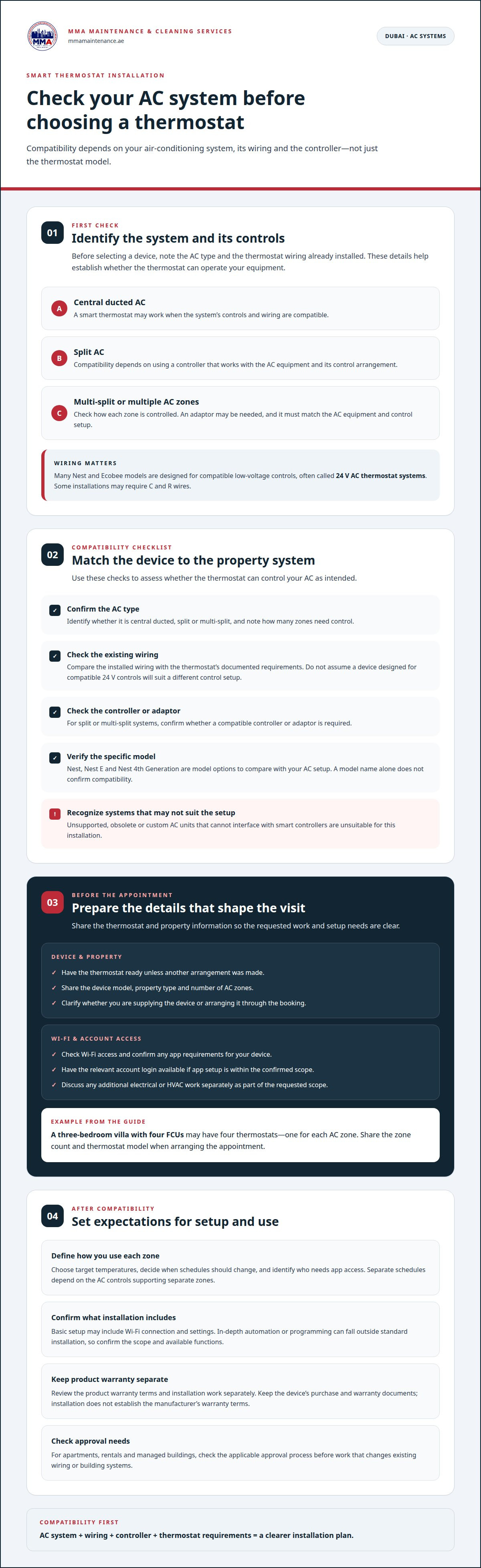
Start by identifying the HVAC system and the thermostat wiring already installed. Google Nest compatibility depends on these details, and many Nest and Ecobee models are designed for compatible low-voltage controls, often called 24 V AC thermostat systems. The thermostat must match the system’s control setup, not just the room’s temperature needs. This first check helps establish whether the device can operate with your equipment.
Central AC System Compatibility
Central ducted AC systems may support smart thermostat installation when their controls and wiring are compatible. For split or multi-split air conditioning, support depends on using a compatible controller. An adaptor may provide an interface if the system requires one, but it must match the AC equipment and control arrangement. The system type, wiring, and controller all affect whether you can adjust settings through a smart thermostat.
Before installation, identify whether the property has central ducted AC, split units or multiple connected zones. Then match the thermostat and any required adaptor to that configuration. A thermostat designed for compatible 24 V controls may not suit a system with different control requirements. Unsupported, obsolete or custom AC units that cannot interface with smart controllers are unsuitable for this setup. These distinctions help you assess compatibility without assuming every thermostat works with every AC system.
Nest thermostat supply, installation, and UAE warranty
Google Nest thermostat compatibility in Dubai depends on the AC system and its wiring. General installation requirements may include removing an existing thermostat, connecting the new unit to Wi-Fi, and configuring basic settings. Depending on the system, installation may require C and R wires.
For apartments and villas, approval depends on tenancy terms and whether the work changes existing wiring or building systems. If you rent or live in a managed building, establish the applicable approval process before arranging alterations. A qualified HVAC or electrical professional can assess whether the system’s controls support a thermostat installation.
Google Nest and Nest E are model names to compare against your AC setup, not substitutes for a compatibility check. The listed product range includes a Nest 4th Generation thermostat. Compare each device’s documented requirements with the system type and wiring, then confirm whether the device is supplied separately or by the installation provider.
Review warranty terms separately from any installation work. Keep the device’s purchase and warranty documents, and distinguish product coverage from installation work. The installation itself does not establish the manufacturer’s warranty terms. Basic setup may cover Wi-Fi connection and settings, while in-depth automation or programming can fall outside standard installation.
If you are supplying the Nest thermostat, check with the installation provider about what to have ready, including access to the premises’ Wi-Fi. App setup also depends on access to the relevant account. These steps can help with pairing and basic configuration, but do not assume every model works with every AC system.
To discuss property technical requirements, speak with the team.
Installation support and customer consultation
Plan the appointment around the thermostat, HVAC system, and access to the property. For apartments, clear setup details help make the visit more orderly.
Requirements for Customer-Supplied Thermostats
Have the device ready unless another arrangement was made when booking. Before the visit, confirm any Wi-Fi, app, or account requirements that apply to your device. Share these details with the team so the appointment can be planned around the confirmed work.
For example, a three-bedroom villa with four FCUs may have four thermostats, one for each AC zone. Share the number of zones and the thermostat model when booking. This gives the team useful context before arrival. A learning thermostat still needs to suit the HVAC system and its controls.
Installation Booking and Customer Support
When arranging an appointment, provide the device details, property type, and number of AC zones. Mention whether you are supplying the thermostat or arranging it through the booking. This information helps clarify the work requested and identify practical requirements for access.
Confirm the installation scope and any setup requirements when booking. If your appointment includes work with an app or device settings, have the relevant login credentials ready and ensure you can access the app. Any additional electrical or HVAC work should be discussed and confirmed separately as part of the requested scope.
Customers provide the smart thermostat unless otherwise agreed when booking. Confirm any app setup requirements with the team in advance; functional Wi-Fi, login credentials, and app store access may be needed, depending on the confirmed scope.
Smart thermostat upgrades and integration
An upgrade works best when its settings match your AC zones and daily routine. Before adding smart-home automation, define which temperature controls you need and whether the HVAC system supports the planned integration.
Start with practical settings: choose target temperatures, decide when schedules should change, and identify who needs app access. For example, a household may set different schedules for occupied and unused rooms if its AC controls support separate zones. Automation should follow the system’s capabilities, rather than assume every unit can be controlled independently.
The Nest Learning Thermostat is one option to assess for an upgrade. Compare its requirements with your existing controls and intended use. A thermostat’s name alone does not establish compatibility or guarantee integration with other smart-home devices. Confirm which functions are available after installation, including scheduling, app control, and any connected automation you plan to use.
When comparing providers, review each written quote and its scope: device supply, compatibility checks, installation, setup, warranty terms, and ongoing support. Consider customer reviews separately, and look for specific feedback about communication and completed work. Features matter only when they suit your AC system and the support included.
In Dubai, a typical smart thermostat installation takes 1-2 hours, depending on system complexity. More involved integration or control changes can affect the work required.
For help planning thermostat integration, discuss your technical requirements.
MMA Maintenance & Cleaning Services
MMA Maintenance & Cleaning Services can help when your thermostat plans connect with broader property work. For electrical work at the property, its Electrical service addresses relevant technical needs. Describe the AC setup, any other planned work, and the outcome you need so the scope is clear from the start.
Smart thermostat decisions may sit alongside other property tasks. A home project could involve House Cleaning, while exterior upkeep may call for Facade Cleaning or Painting. These are separate needs, but discussing them together can help clarify the work taking place at the property and which service relates to it. Keep thermostat compatibility requirements distinct from unrelated work.
For a useful discussion, have the thermostat model and AC system details ready if they are relevant to your request. Explain whether the work concerns the existing electrical setup or another property requirement. Clear information helps MMA Maintenance & Cleaning Services understand your needs and keep the discussion focused on its services. It also helps distinguish smart-device configuration from other building work.
For Electrical work, explain the property issue in plain terms and note any related work you are planning. For House Cleaning, Facade Cleaning, or Painting, describe the area and the work required. This keeps each request specific without assuming separate tasks share the same technical scope. You can then discuss the relevant service and next step with the company.
For help with a property requirement, contact MMA Maintenance & Cleaning Services and describe what you need.
Plan the next step for your property
Turn your thermostat plans into a clear work brief. Consider which rooms or AC zones you want to manage and what you want to simplify in your daily routine. If the project involves other property work, mention that too. This gives the discussion a practical focus beyond device features.
For smart thermostat installation services in Dubai, discuss your property requirements and the work involved. MMA Maintenance & Cleaning Services offers Electrical for property electrical needs, as well as House Cleaning and Facade Cleaning. Painting is also available for planned property upkeep. Each service addresses a distinct task, so describe the requirement you want to discuss.
The experienced team can help clarify the scope of related property work. Tell MMA Maintenance & Cleaning Services what you need, and take the next step with a clear plan. Contact MMA Maintenance & Cleaning Services to discuss your requirements.
Frequently Asked Questions
Is a smart thermostat a practical upgrade?
A smart thermostat can be a practical upgrade if you regularly change cooling settings or want to manage your home’s temperature while away. Consider your daily routine, how often rooms are occupied, and whether you would use scheduled settings. For example, a household with different weekday and weekend routines may find scheduling useful. The benefit depends on whether those controls address a real need for you.
What should you consider when planning smart thermostat installation in Dubai?
Start with the property’s AC arrangement and the thermostat functions you want to use. Note whether you need control for one area or several, and whether remote access or scheduled settings would help. In an apartment, also consider how the work fits with the building’s systems and your access arrangements. A clear plan helps define the installation scope before booking.
What wiring and HVAC compatibility checks are needed before installing a smart thermostat?
Match the thermostat model to the AC system, control wiring, and number of zones. Many smart thermostats are designed for compatible 24 V controls, while some systems may require C and R wires. For example, a multi-zone property needs controls suited to the way those zones operate. A mismatch can prevent the thermostat from controlling the AC properly.
What are the steps to install and configure a smart thermostat?
First, identify the HVAC system and match it to the thermostat’s requirements. Next, remove the existing thermostat if present and connect the replacement using compatible wiring. Then connect it to the premises’ Wi-Fi, pair the app with your phone or tablet, and configure basic settings. Finish by checking that the thermostat responds to temperature adjustments and controls the intended AC zone.
Do smart thermostat devices and installation work have warranty coverage?
Warranty coverage depends on the device and its purchase terms, while installation work depends on the agreed scope. Keep the device documentation so you can refer to its applicable warranty details. Before work begins, clarify what the installation includes and which thermostat functions will be configured. This helps you understand the agreed work and relevant next steps.
How do smart thermostat installation services in Dubai compare on reviews and features?
Review feedback about communication and completed work, and check whether the service covers compatibility checks, installation, setup, and warranty terms. Features may include remote access, temperature control, scheduling, and app setup, subject to system compatibility.


